
Hostinger and noCode website builder are already synonymous, but it doesn’t look like Hostinger is going to stop improving anytime soon. So new tools and features just keep rolling out and AI is getting better. So it’s time for an updated Hostinger AI website builder review.
Hostinger pricing & plans
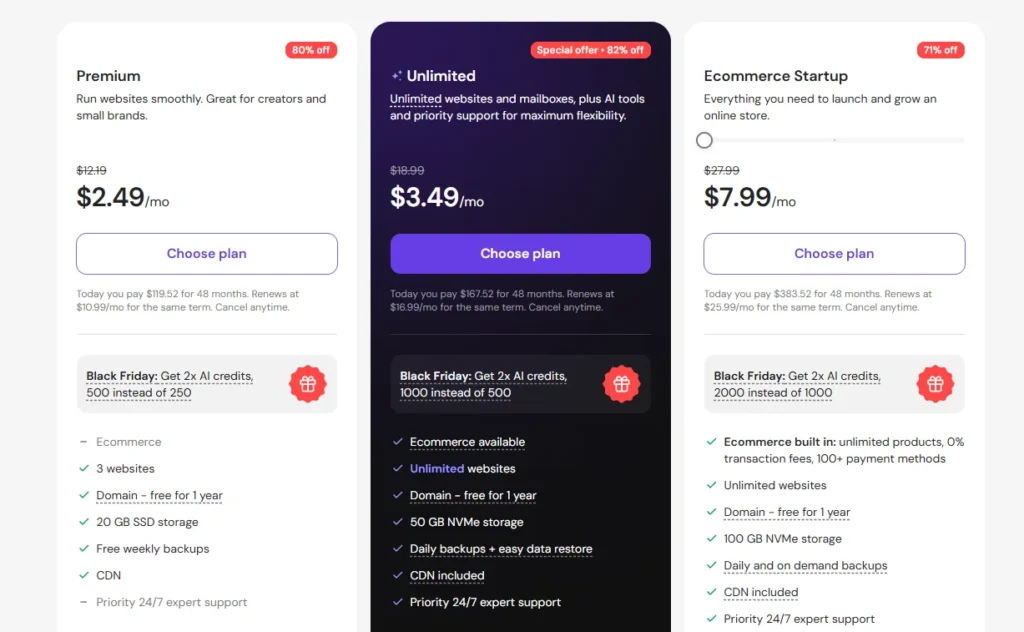
First, let’s review hostinger’s plans.There are two options, the premium and business.The price point is actually super low.
Even if you don’t use my discount, despite such a low price point,the plans include nice extras such as free domainfor the first year, free domain privacy protection,a free content delivery network for faster loading speeds worldwide,and even an additional performance boost feature,which you can use for free once a month.
Not to mention that Hostinger gives multiple websiteswith both of the plans, when most competitors just give you one per subscription.
OTHER POST:- Base44 Tutorial: Build The Best AI App?
Which Hostinger plan is right for you?
What’s the difference between the plans though? The premium plan is the more affordable option and is great for simpler websites like blogs, portfolios, or personal projects. That said, it has limited AI features. Yes, you do get AI website builder, but most other AI tools for editing your website or content creation are not included.
So that’s why I’d recommend the business plan. It’s only just a little bit more expensive, but it unlocks a much larger AI toolkit and ecommerce. It also gives more resources and additional tools like tracking performance with live analytics. So if you’re planning to create a business website, online store, or simply just want to get the most out of Hostinger AI, the business plan is definitely the way to go.
Whichever plan you choose though, the prices that you’re seeing already include my Hostinger coupon code, which gives you the biggest discount out there. Oh, and I probably don’t need to go for the longest billing period for the lowest price.
How to build a website with AI?
So it seems like great pricing for what you get, but if the building a website with AI experience is not great, all that doesn’t matter. Right? So luckily it’s far from that. Getting started can’t be easier. I just select an option to create a website with AI by clicking on Hostinger website builder and then type a short description of what my site is about. And I let Hostinger do its thing. The generation process usually takes around a minute.
So you can either waste that time by doing nothing or by playing this Hostinger game, or I don’t know, just stare dramatically out the window. Once the created website loads, you’ll have an option to just go with it into the editor or generate it again. Now, if the overall design isn’t quite the vibe you’re after, you can generate a new version with the same prompt or create a different one.
Thankfully, this is not like vibe coding or some other greedy AI tool that makes you pay for every prompt. Regenerating websites is completely free.
Hostinger templates: 300+ options
Now, before jumping into website editing, you may have noticed another option, templates, and there are a lot of them, more than 300.
In fact, what’s nice is that some of these templates also come with AI builder functionality, giving you a hybrid approach where you start with a professionally designed template and then apply a prompt to speed up the rest of the work. So while creating a website with AI is super quick and simple, the editing part usually is at least a little bit more challenging.
Hostinger editor: how easy is it to use?
Yes, that’s true even with Hostinger, but honestly, out of the options that I’ve tried, this might be the easiest editor out there.
So let’s have a quick Hostinger review of its editor. It uses simple drag and drop controls, allowing me to move sections around, replace images and text, add new elements, or delete anything I don’t need. Of course, the real highlight is the collection of AI tools that are built directly into the editor.
Best Hostinger AI tools for editing
For most of these, you will need the business plan. Yeah. Hey, I warned you in the pricing section. Anyway, one of those is the AI logo maker. And so if you’re starting a new brand, it can really help you create a professional looking logo without spending a ton of extra money on design work. Alongside that, there are AI image tools that can generate visuals for my website. Pretty damn useful when I have no photos to populate my site.
The AI writer is of course also included. It can generate website copy for my homepage services and other sections in seconds. Keep in mind, it’s still AI though. So you might want to edit it afterwards. And if you’re building an online store, the AI product description generator can automatically create product listings, which saves a ton of time and tedious work and tying everything together is cody. That’s hostinger’s AI super assistant. They don’t call it super, but at this point they probably should.
I mean, it can help you find tools, answer questions, guide you through features, and even just complete certain tasks for you. And best of all, it feels like an actual assistant because it understands simple lingo without technical terms. This is one of the reasons Hostinger stands out from other AI web builders.
It’s not just the building part. The AI tools help you a ton afterwards as well. All right.
My final verdict
Overall, Hostinger AI website builder does exactly what I want from the best AI website builder. It gets you from idea to launch much faster and keep in mind that AI is there to give you a strong foundation, not a finished masterpiece. You’ll still want to make some edits and add your personal touch. So that’s going to be it for this Hostinger website builder review.