
Here’s a quick fact for you. Even the simplest app, like this app, can be used by hundreds of thousands of people every day. Yeah, that’s crazy, right? But here’s one better. What if you could create a viral app like that yourself without writing a single line of code? Sounds like magic. Well, let me teach you how to be a wizard with my Base44 tutorial. By the end of this video, you’re going to know how to use Base44 and how to go from an idea to a fully working app that you can actually launch and make money from.
First, you head over to Base44. No-Code App Builder using my link now. Then simply create your account. Once you’re in, you have two main options:
Building an app with AI
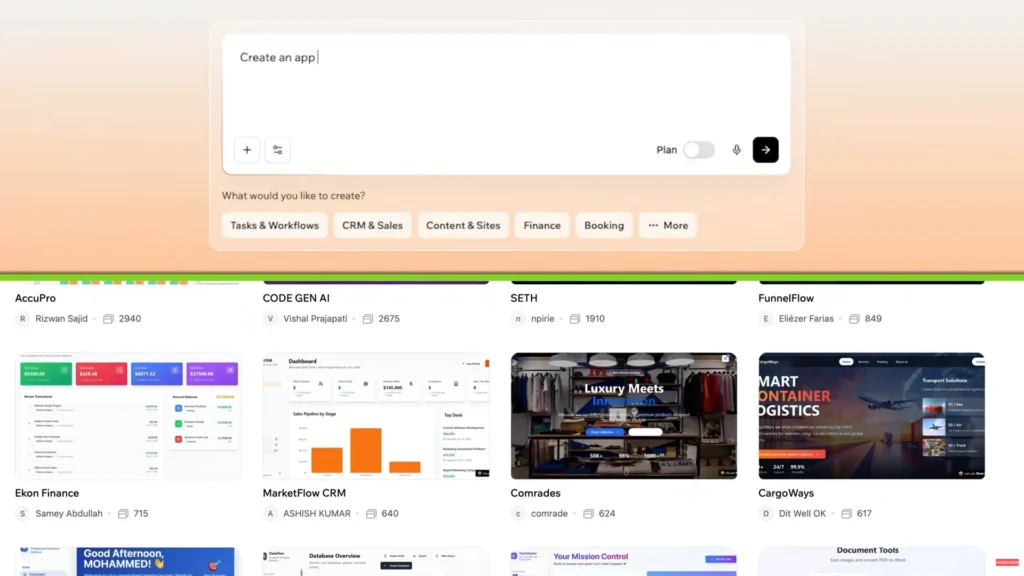
you can either write your own prompt or choose from ready-made templates. This is where things get fun. For this Base44 tutorial, I’m thinking about a fully working travel planner app. It needs trip planning, a to-do list, a map, and budget tracking.
Yeah, the whole package. Let’s build an app with AI tools by simply describing what we want. Like, create an app where users can plan trips, add activities, track expenses, and view everything on a map.
That’s it on how to build an app without coding. You don’t need to go into too much detail or technical jargon. Just describe the app in your own words. Don’t overthink it. Then you just give it a few moments, and Base44 is done cooking.
After generating the app, you can jump into preview mode and start customizing.
OTHER POST:- 10 Hollywood के UNEXPECTED Sequels जल्द आ रहा है।
Customizing your app
You want to add a new feature? Just type a prompt. You want to change how something looks? Same thing. Also, let’s talk about something important. The difference between the Front End and the Back End.
Don’t worry, I’ll keep this simple. The Front End is what users see. It’s the buttons, the text, the layout, the whole user interface. The Back End is everything happening behind the scenes: the data collection, logic tasks, and connection to servers.
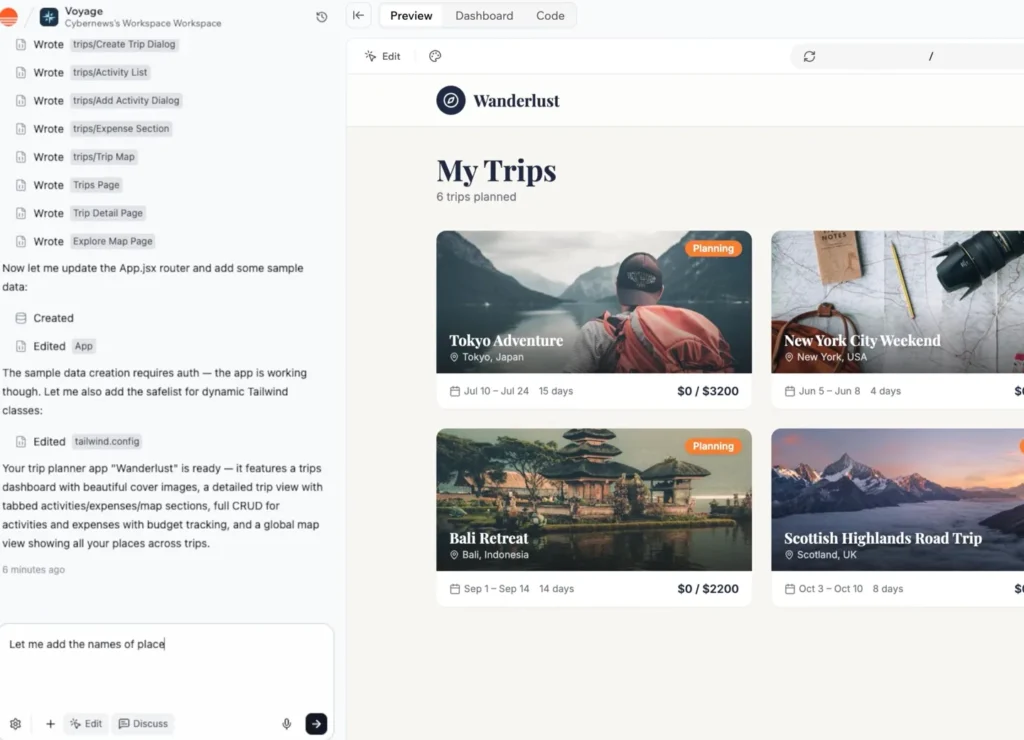
Base44 handles both, which is huge because normally, you’d need two different skill sets to manage this.
Here, you’re not going to need to touch the Back End at all, but you can describe it if you want the app to operate with specific logic or structure. If you’re not sure what to do next, there’s something called Discuss Mode. This is like having a brainstorming partner built into the platform. Okay, maybe it’s not that fancy, but you get the idea.
You can ask questions, explore ideas, and plan your app before making any changes. It’s very useful if this is your first time making a web application.
Now, once you’re ready, you switch back and apply everything instantly. There’s also Edit Mode. Use edit mode to make changes to the design of your app. You can do it manually, or you can ask the AI to make the changes for you. The best thing is that you can undo 50 steps, so you can test things out and get back to your base app any time.
OTHER POST:- Hostinger AI Website Builder for beginners?
Launching your app
By now, our apps are basically fully developed, and it took what, a few hours at most? But now the next stage, launch app with AI.
When you build your app on platforms like Base44, it starts as a web-based app,
but to publish it on platforms like the Apple App Store or Google Play Store,
it needs to be converted into a mobile-ready app.
This is where Base44 AI App Builder helps with a process called Wrapping. It converts your app into a mobile-compatible format and even assists with submission.
This is available on more expensive plans, though with my link, they’re not that expensive.
That said, and listen carefully, you’re still going to need to upload your app using developer accounts. While Base44 Guide helps you through the process, you’re still responsible for ensuring your app complies with store guidelines. You can’t just plop any random app and be done with it.
There are strict restrictions for both storefronts. Think of Base44 as a powerful assistant, not a fully hands-off solution. The final product success is still up to you.
Pricing & credit system
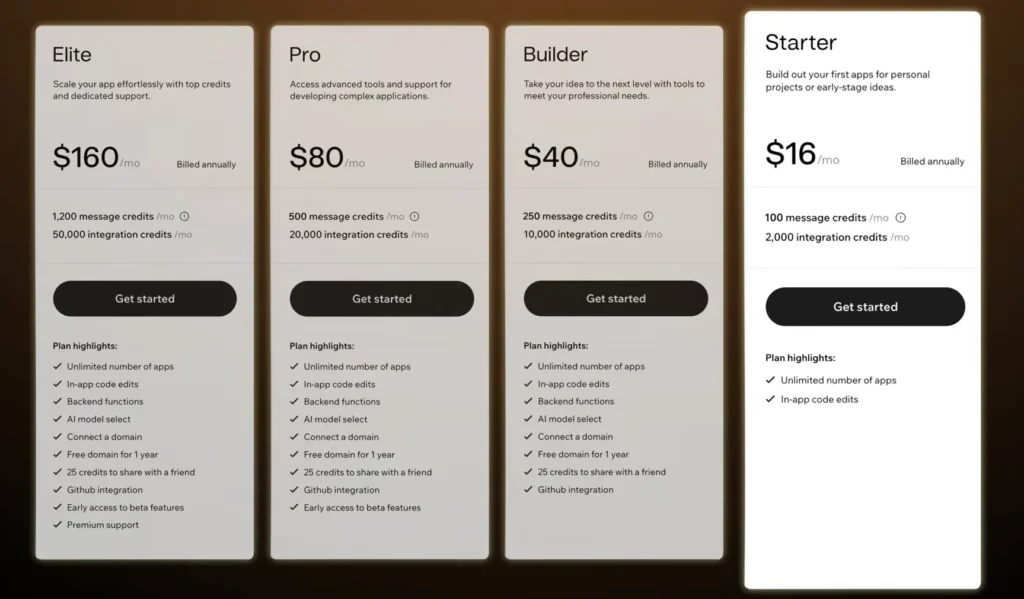
All right, let’s quickly touch on Pricing. Base44 AI App Builder offers quite a nice selection of different plans.
The free version is great for testing, but naturally it has very tight limits. To actually build and launch a mobile app, you’re going to need a paid plan. If you’re serious about building apps, I recommend the Builder subscription as it covers most of what you’ll need. But if you’re here to build and run a single app, the Starter plan is perfect for you.
Now, there are two types of credits that you should understand. The message credits are used when you build and modify your app. Every prompt you send uses them. Integration credits are used when your app interacts with external services like fetching live data or processing user actions after launch.
As your app grows, so does your usage. Luckily, it’s not hard to upgrade your plan once you reach that business success.
Conclusion
Okay, so at the end of the day, you know how to build an app with AI, and Base44 makes it as easy as it can be, and that’s what I love about it. Now you can spend your time building, not just learning how to code the Back End. Check out Base44. Try it yourself. See what you can build. All right. Thanks for reading this article. If you have any questions or want to chat about your app idea.